

CDC replication
Stream changes from Google Cloud SQL for PostgreSQL to data warehouses, other databases, and cloud storage buckets like S3.
CDC replication only for Bulk SyncsCDC replication from PostgreSQL is only available for Bulk Syncs.
When creating a Polytomic Bulk Sync from Google Cloud SQL for PostgreSQL to your data warehouse, it's preferred (though not required) for Polytomic to use CDC (change data capture) replication. This avoids running full table scans to find changes since the last sync. Instead, Polytomic captures changes in real time without scanning your tables.
This page covers the Cloud SQL-specific setup. For the underlying PostgreSQL concepts (publications, replica identity, replication slots, and how deletes are propagated), see the general PostgreSQL CDC replication guide.
Requirements
Cloud SQL for PostgreSQL controls server settings through database flags rather than a configuration file. You set these flags on the instance in the Cloud SQL console. Some flags require an instance restart; the console tells you which and prompts you to restart.
Enable logical decoding
Polytomic uses the pgoutput plugin, which requires logical decoding.
-
In the Cloud SQL console, click on the Actions menu and select Edit.
-
Expand the Flags and parameters section and click Add a database flag.
-
Set the
cloudsql.logical_decodingflag toonand click Done. -
Click Save. Applying this flag requires an instance restart, so plan for a brief interruption.
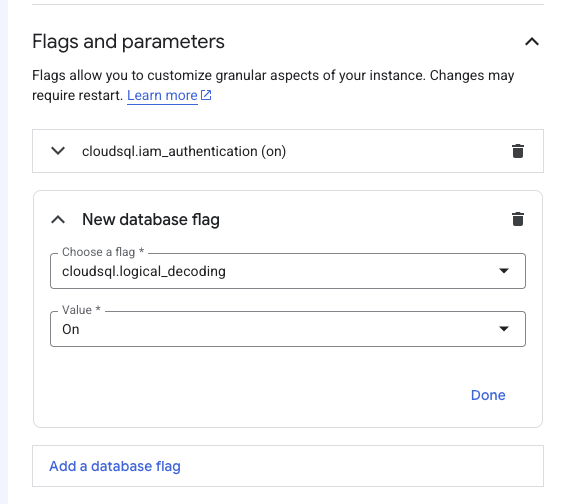
Setting cloudsql.logical_decoding to on puts the instance's wal_level into logical mode. You can confirm this after the restart:
SHOW wal_level;
-- wal_level
-- ---
-- logical
Replication slots and WAL senders
Polytomic requires a replication slot for each Bulk Sync. Cloud SQL defaults max_replication_slots and max_wal_senders to 10, which is enough for most setups. If you run many concurrent replication slots, raise these values with database flags (both changes require a restart):
max_replication_slotsmax_wal_senders
You can inspect current replication slots with the pg_replication_slots system view:
SELECT * FROM pg_replication_slots;Grant the REPLICATION attribute to your user
REPLICATION attribute to your userThe REPLICATION attribute lets a PostgreSQL user manage replication slots. Polytomic uses it to create a replication slot for each Bulk Sync.
Connect as a user with the cloudsqlsuperuser role (for example, the default postgres user) and grant the attribute to your Polytomic user:
ALTER USER polytomic_user WITH REPLICATION;Create a publication
PostgreSQL uses a publication to track changes to one or more tables. Your publication name can be anything; you'll enter it in Polytomic's connection configuration.
-- create a publication for specific tables
CREATE PUBLICATION polytomic FOR TABLE <table>, <table>, ...;

-- create a publication for all current and future tables
CREATE PUBLICATION polytomic FOR ALL TABLES;
Tables without primary keysPostgreSQL requires a replica identity to replicate
DELETEandUPDATEoperations for a table. By default this is the primary key for non-system tables. Adding a table without a primary key or replica identity to the publication causes errors when rows are updated or deleted, so do not add such tables to the publication.
For more detail on publications, replica identity, and editing an existing publication, see the PostgreSQL CDC replication guide.
Set Polytomic to read your logical replication log
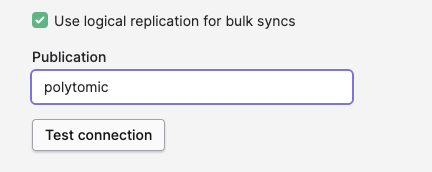
Once the previous steps are done, turn on the Use logical replication for bulk syncs setting and enter your publication name in your Google Cloud PostgreSQL connection configuration:
Advanced settings
Polytomic manages the replication slot for you by default, propagates deletes as soft deletes, and offers options for tables without primary keys. These behaviors are the same for Cloud SQL as for any other PostgreSQL source. See Advanced settings in the general PostgreSQL CDC replication guide.
Updated 3 months ago