

S3 Event Notifications via AWS SQS
Polytomic is able to incrementally read data from S3 by reading Event Notifications from an AWS SQS queue. There are three components to supporting incremental reading: an SQS queue, S3 notification rules, and Polytomic configuration.
SQS Queue
An SQS queue must be created that will receive event notifications from S3. The queue policy must allow S3 to publish events and Polytomic's AWS account (account ID 568237466542) must be allowed to consume events from the queue.
If you use Terraform to manage your infrastructure, the following demonstrates configuring a queue with an appropriate policy.
# SQS Queue for S3 event notifications
resource "aws_sqs_queue" "s3_events" {
  name                       = var.queue_name
  visibility_timeout_seconds = 300
  message_retention_seconds  = 345600 # 4 days
  receive_wait_time_seconds  = 20     # Enable long polling

  tags = var.tags
}

# SQS Queue Policy allowing S3 to send notifications and cross-account access
resource "aws_sqs_queue_policy" "s3_events" {
  queue_url = aws_sqs_queue.s3_events.id

  policy = jsonencode({
    Version = "2012-10-17"
    Statement = [
      {
        Sid    = "AllowS3ToSendMessage"
        Effect = "Allow"
        Principal = {
          Service = "s3.amazonaws.com"
        }
        Action   = "SQS:SendMessage"
        Resource = aws_sqs_queue.s3_events.arn
        Condition = {
          ArnEquals = {
            "aws:SourceArn" = data.aws_s3_bucket.existing_bucket.arn
          }
        }
      },
      {
        Sid    = "AllowCrossAccountConsume"
        Effect = "Allow"
        Principal = {
          AWS = "arn:aws:iam::568237466542:root"
        }
        Action = [
          "SQS:ReceiveMessage",
          "SQS:DeleteMessage",
          "SQS:GetQueueAttributes",
          "SQS:GetQueueUrl"
        ]
        Resource = aws_sqs_queue.s3_events.arn
      }
    ]
  })
}
S3 notification configuration
The S3 bucket must be configured to emit events to the queue you configured. You should configure it to send the following events:
s3:ObjectCreated:*s3:ObjectRestore:*
The AWS documentation covers configuring event notifications via the console. If you use Terraform, the following demonstrates setting the notification configuration for an existing bucket:
# S3 Bucket notification configuration
resource "aws_s3_bucket_notification" "bucket_notification" {
  bucket = data.aws_s3_bucket.existing_bucket.id

  queue {
    queue_arn = aws_sqs_queue.s3_events.arn
    events = [
      "s3:ObjectCreated:*",
      "s3:ObjectRestore:*"
    ]
    filter_prefix = var.notification_prefix
    filter_suffix = var.notification_suffix
  }

  depends_on = [aws_sqs_queue_policy.s3_events]
}
Note that this example declares a dependency on the queue in the previous example; this ensures Terraform creates the queue and updates its policy before attempting to assign it to the bucket.
Polytomic connection configuration
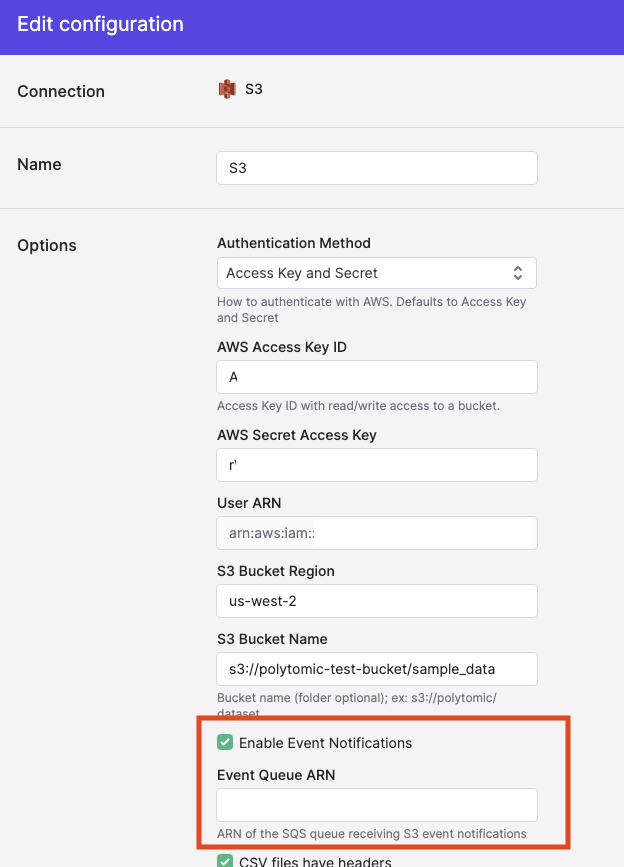
In the Polytomic connection configuration, check the box for "Enable Event Notifications" and enter the ARN of the SQS queue you created. For example, arn:aws:sqs:us-east-2:123456789:polytomic-s3-events.
Updated 3 months ago